Discourage screenshots with Screen Shield
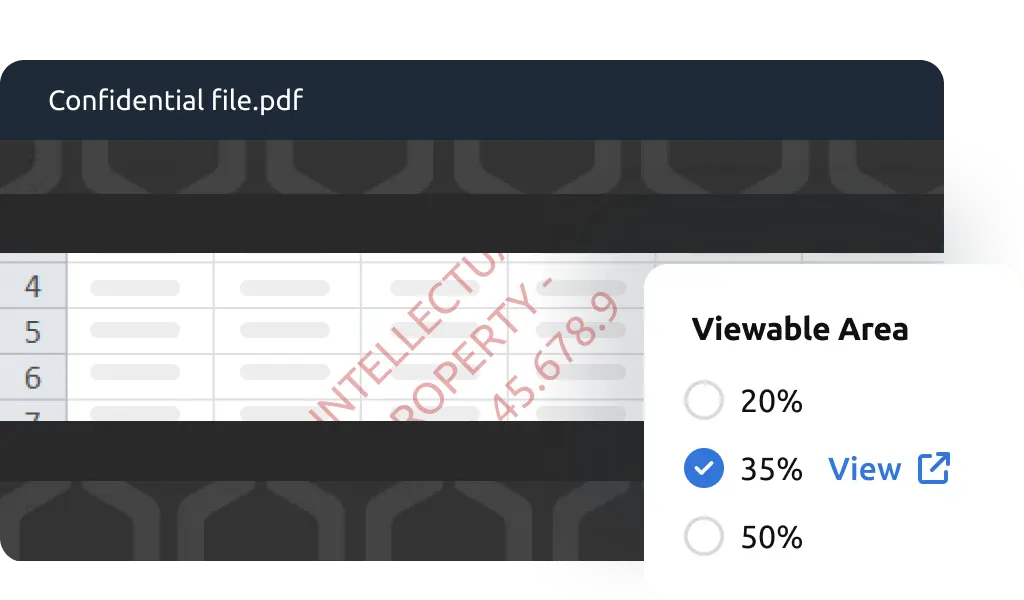
Screen Shield limits the visible document area, blurs content when the viewing window becomes inactive, and discourages Print Screen attempts with an on-screen warning.
No credit card needed
Security that keeps your files in focus
-
Reduce visible screen area to 20, 35, or 50 percent for stronger deterrence
-
Blur or hide content during screenshot attempts or when the viewer switches windows or tabs
-
Pair with Dynamic Watermark for layered file protection
-
Enable Screen Shield when sending files with Document Security or while hosting them in Data Rooms
-
Toggle on or off depending on the sensitivity of your documents
Screen Shield for every use case
Mergers & Acquisitions
Protect deal documents from leaks. Keep confidential data room content secure by discouraging screenshots and restricting screen visibility.
Fundraising
Safeguard pitch decks and investor updates. Discourage screenshot sharing during due diligence with Screen Shield that limits captures.
Legal & Compliance
Protect confidential contracts during sensitive reviews or audits. Screen Shield limits how much of a document is visible at once, discouraging visual copying and unauthorized sharing.
Intellectual Property Protection
Keep research, designs, and media secure. Screen Shield makes it difficult for recipients to capture creative or high-value files without authorization.
Built for leak-resistant sharing
-
Fundraising & Venture Capital
Safeguard pitch decks and investor updates. Discourage screenshot sharing during due diligence with Screen Shield that limits captures. -
Mergers & Acquisitions
Add an extra safeguard to deal rooms where confidentiality is critical. Make sensitive transaction documents harder to capture in full and reshare. -
Legal & Compliance
Safeguard contracts and regulated documents during sensitive reviews or audits. Discourage visual copying by limiting document visibility and blurring content when the viewing window is inactive. -
Startups & SMBs
Safeguard investor decks, product roadmaps, and business plans during fundraising or partnerships. Make sensitive intellectual property harder to capture and share outside the intended audience. -
Finance & Banking
Secure financial reports, client information, and due diligence files during sensitive transactions. Reduce the risk of unauthorized capture by limiting how much content viewers can see at one time. -
Media & Creative Teams
Protect intellectual property, designs, and creative content from screenshot theft. Preserve copyright and ownership rights by reducing unauthorized duplication.
“Digify is a simple yet secure tool that provided the necessary integration with the infrastructure we already use. This made picking and using Digify for our internal teams an obvious decision.”
Jonathan Agha
Former Head of Information Security
WeWork
“The interface, access controls are all very intuitive. I am able to see granular level data on document access and review. It helps provides information for insights into how a diligence process is operating. The integration with Gmail is also very useful to regularly send secure emails without leaving the gmail interface.”
Arjun Sharma
Director, Legal
Peak XV Partners
“We’ve been using Digify for the last year to help securely send private documents to external partners. Their product saved us a lot of time from having to build our own tool to securely share these documents. Their product is feature rich, they respond to customer feedback, and their support team is on top of things always open to creative solutions to unique problems.”
James Costa
Principal Product Manager
Wrapbook
“Digify demonstrated it was the most innovative by highlighting a simple and inexpensive way to address a recurring challenge of controlling and protecting ideas and information.”
Hugh Thompson
CTO, Symantec Head Judge
RSA Innovation Sandbox
“We use Digify to securely send sensitive documents as part of due diligence processes and security reviews. We like to keep our confidential documents close to the chest. With Digify, we are always in control of who has access and who doesn’t.”
Jonathan Dunlop
Formal General Counsel
Vidyard
“We love that we can provide our prospective and active portfolio company with secure data rooms and also that we easily can use Digify to send confidential presentations with preset timeouts. Digify creates a simple way to give and to revoke access to individual documents as needed.”
Will Klippgen
Managing Partner & Co-founder
Cocoon Capital
“We always use Digify to maintain a data room for investors so that sensitive information is still protected, even when it is sent externally. I’m very likely to recommend Digify for its ease of use and of course, the security.”
Jonathan E. Savoir
CEO & Co-founder
Quincus
Screen Shield FAQs
Screen Shield is a feature that limits the visible document area, blurs content when the viewing window becomes inactive, and discourages Print Screen attempts with an on-screen warning.
If a screenshot attempt is detected, Digify hides or blurs file content. Screen Shield also restricts the viewable area for added data leakage protection. Learn more.
Yes. Recipients can read documents in their browser, but only a portion of the screen is visible when Screen Shield is enabled.
Most screenshot shortcuts and plugins are blocked. However, some system-level methods may not always be preventable. Screen Shield still makes capturing entire documents highly inconvenient as it would require taking multiple screenshots and piecing them together.
Yes. Screen Shield can be turned on when sending individual files or applied at the data room level for all content.
Yes. For maximum security, use it with Dynamic Watermark, tracking, and expiry controls.
No. Screen Shield is designed to discourage screenshots by limiting document visibility and obscuring content during supported capture attempts, but it cannot block every screenshot method across all devices and operating systems. For stronger protection, combine it with Dynamic Watermark, which adds viewer-specific information to the document and makes captured or reshared screenshots easier to trace back to the recipient.
Share sensitive files with greater control using Screen Shield
-
No credit card required
-
Instant activation to features
-
Human support included